
In today’s fast-moving business world, staying on top of your finances is crucial. One smart way businesses are doing that? Cloud-based accounting software. Whether you’re running a startup or managing a growing enterprise, this digital shift can simplify your financial operations, save time, and improve accuracy. But what exactly is cloud accounting, and why are so many companies making the switch?
Let’s explore everything you need to know.
What is Cloud-Based Accounting Software?
Cloud-based accounting software is a financial tool that allows users to manage their books and access data via the internet, rather than relying on desktop software. All your data is stored securely on remote servers (a.k.a. the “cloud”), which means you can access it anytime, anywhere.
How It Works
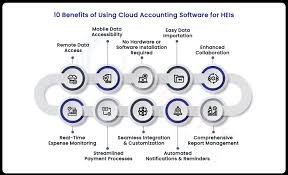
Instead of installing programs on one device, cloud accounting software works through a web browser or app. Your data is synced in real time and stored securely by the software provider. This removes the hassle of manual updates and backups.
Popular Examples
- QuickBooks Online
- FreshBooks
- Zoho Books
- Xero
Each offers a range of features like invoicing, payroll, reporting, and integrations.
Key Benefits of Cloud-Based Accounting Software
Switching to cloud accounting isn’t just about convenience—it’s about transforming how your business operates. Here’s why it matters:
Real-Time Access and Data Syncing
Access your financial data anytime, from any device. Whether you’re at home, in the office, or on the go, your books are just a click away. Changes sync instantly, so your team always works with the latest numbers.
Cost Efficiency and Scalability
You usually pay a monthly fee, which means no large upfront costs. Plus, you can scale your plan as your business grows, only paying for what you need.
Enhanced Data Security
Cloud platforms use encryption and advanced security protocols to keep your financial data safe. Most providers also offer automatic backups, reducing the risk of data loss due to hardware failure or cyberattacks.
Improved Collaboration and Remote Access
Multiple users can access the software simultaneously. Your accountant, bookkeeper, or finance team can all work together in real-time, no matter where they are.
Automated Updates and Integrations
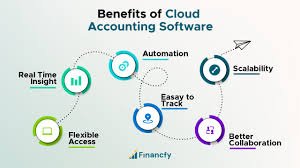
Forget manual updates. Your software stays current with tax laws, features, and patches automatically. It also integrates smoothly with other tools like payment processors, CRMs, and payroll services.
Better Decision-Making with Real-Time Insights
Cloud software gives you access to real-time dashboards and reports. This means you can make quick, data-driven decisions based on your actual financial performance.
Comparing Cloud-Based vs. Traditional Accounting
| Feature | Cloud-Based Accounting | Traditional Accounting |
| Accessibility | Anywhere, anytime | Only on installed devices |
| Updates | Automatic | Manual installation |
| Backup & Security | Encrypted, off-site | On-device only |
| Cost | Monthly fee | One-time software cost |
| Collaboration | Real-time, multi-user | Limited access |
Who Should Use Cloud-Based Accounting Software?
Cloud accounting isn’t just for large companies. It’s ideal for:
- Small businesses looking for affordable, easy-to-use tools
- Freelancers needing to manage invoices and expenses efficiently
- Medium-sized enterprises wanting real-time financial control and scalability
It also benefits non-profits and startups that operate with remote teams or limited resources.
Potential Drawbacks to Consider
While cloud accounting has many upsides, it’s not without a few cons:
Internet Dependency
You need a stable internet connection to use cloud-based software effectively. If your connection is weak, access might be limited.
Subscription Costs
Monthly fees can add up over time. However, this is often offset by saved time and increased efficiency.
Data Migration Concerns
Moving from traditional to cloud software may require help to ensure all your data transfers correctly.
Tips for Choosing the Right Software
Choosing the best cloud-based accounting software depends on your needs. Here’s what to consider:
- Budget – Compare pricing plans to find one that fits.
- Features – Look for tools like invoicing, inventory, reporting, and integrations.
- Customer Support – Reliable support is crucial during setup and troubleshooting.
Always test with a free trial if available.
Conclusion
Cloud-based accounting software is transforming how businesses handle their finances. From real-time access and cost savings to better collaboration and insights, the benefits are clear. Whether you’re a freelancer or managing a growing company, switching to a cloud-based solution can simplify your processes and put you in better control of your financial future.
Looking for ways to modernize your business tools? Cloud accounting might be the smartest move you make this year.